
In today’s increasingly digital world, the convenience of online banking comes with inherent risks, most notably phishing scams. These deceptive tactics employed by cybercriminals aim to steal sensitive information such as usernames, passwords, and financial details. Understanding how to recognize and avoid these phishing scams is crucial for protecting your financial well-being and maintaining the security of your digital banking activities. This article provides essential guidance on identifying the red flags of phishing attempts and implementing effective strategies to safeguard yourself from becoming a victim.
Phishing attacks in the context of digital banking can take various forms, from fraudulent emails and text messages masquerading as legitimate bank communications to deceptive websites mimicking official banking portals. These sophisticated scams often exploit psychological manipulation and technical trickery to deceive unsuspecting individuals. By familiarizing yourself with common phishing techniques and adopting proactive security measures, you can significantly reduce your vulnerability to these threats and ensure the safety and security of your digital banking experience.
What Is Phishing in Digital Finance?
Phishing is a cybercrime where fraudsters impersonate legitimate entities, often financial institutions, to trick individuals into revealing sensitive information.
In the context of digital finance, this typically involves deceptive emails, text messages, or website mimicking banks or payment processors. The goal is to steal usernames, passwords, credit card details, social security numbers, and other valuable data.
Phishing attacks exploit human trust and can lead to significant financial losses, identity theft, and account takeover.
Signs of a Suspicious Message or Link
Suspicious messages often exhibit several key characteristics. Look for misspellings and grammatical errors. An unfamiliar tone or greeting can also be a red flag.
Links can be deceptive. Hover your mouse over the link to see the actual URL. Be wary of shortened URLs or links that don’t match the purported sender. Urgent calls to action, demanding immediate clicks, are a common tactic.
Requests for personal information, like passwords or account numbers, through email or unsolicited messages are almost always fraudulent. Legitimate institutions will never make such requests.
Don’t Share Your Login Info or OTP
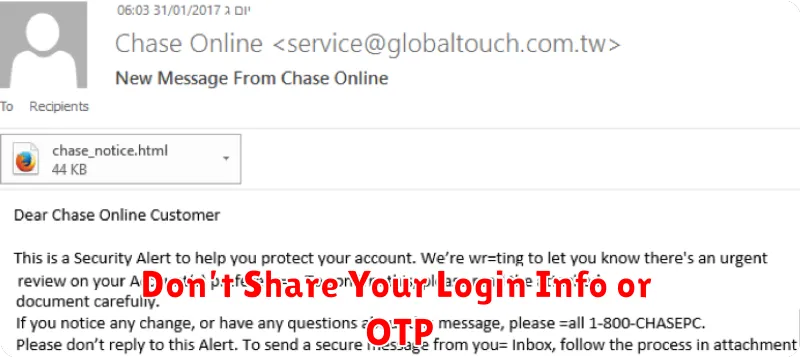
Never share your banking login credentials (username and password) with anyone, including bank personnel. Legitimate banks will never request this information. Similarly, your One-Time Password (OTP) is for your exclusive use. Never disclose it via email, phone, or text message. Sharing this information grants unauthorized access to your account.
Treat your login details and OTP like your house key – keep them private and secure. Sharing them puts your finances at significant risk.
Always Check the Sender’s Details
Phishing attempts often use deceptive sender information. Before interacting with any email or message, carefully scrutinize the sender’s name, email address, and phone number (if applicable). Look for inconsistencies or misspellings in the domain name, which can indicate a fraudulent source. Legitimate banks use official, secure domains. Don’t rely on display names alone, as they can be easily manipulated. Instead, verify the actual email address behind the name.
Use Official Apps and Websites Only
Always access your bank’s services through official channels. Download banking apps exclusively from the official app stores (Apple App Store, Google Play Store) and verify the developer’s information.
When using a web browser, double-check the website address in the address bar to confirm it matches your bank’s official URL. Be wary of slight variations in spelling or domain extensions. Look for a secure connection indicated by a padlock icon and “https” in the address bar.
What to Do If You Clicked a Bad Link
If you suspect you clicked a phishing link, act quickly. Disconnect from the internet immediately to prevent further data transfer. This includes Wi-Fi and ethernet connections.
Scan your device with a reputable anti-malware program. A full system scan is recommended. Change your passwords, especially for banking and other sensitive accounts. Report the phishing attempt to your bank and the appropriate authorities.
If you entered any personal information, monitor your accounts closely for unauthorized activity. Consider placing a fraud alert or a credit freeze on your credit reports.
Report Phishing Attempts Immediately
If you suspect you’ve encountered a phishing attempt, reporting it is crucial. This helps protect yourself and others from falling victim.
Report the incident to your bank immediately. They can take steps to secure your account and investigate the source of the phishing attack.
You should also report the phishing attempt to the appropriate authorities. This could be your local law enforcement or a dedicated cybercrime reporting agency.
